
6 the latest critical updates Google Analytics in 2013
6 latest critical updates for Google Analytics users in past year.Despite being one of the most important changes Google is considered encryption requests cached users. This led to the emergence of «not provided» in statistics, key words in Google Analytics. For marketers who constantly work with information, this was a serious blow. Fortunately, for them, the company has developed 14 new features of the service, to help you cope with the loss of data.
1st: New Google Analytics reports
When the user enters in the new Google Analytics account, you can immediately notice that changed names reports: the Traffic Sources (Acquisition) and Behavior. The Traffic Sources section 2 provides new block: General Information (Overview) and Channels (Channels).
Report General information reflects Analytics behavioural data for the best channels: (Social, Organic, Direct, and sources (Facebook, Twitter, LinkedIn) or media (Organic, Referral, Email).
Essentially, the Report General information will help the administrator to see which channels bring the most visitors, what ’ s involved users, and which most of the conversion.
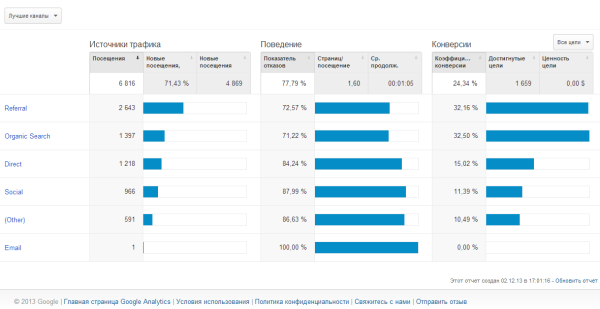
the Report General information displays a brief summary of the data and Channels report provides a detailed picture of the behavior of the user for each channel. Users the option to create and configure a channel group if they are not satisfied with the default group.
2nd: ABC analyst
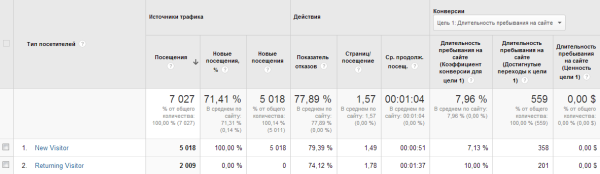
One of the most visible changes in Google Analytics was the introduction of new format reports that groups data based on indicators such as traffic Sources (Acquisition), behaviour (Behaviour) and conversion (Conversions).
New feature helps users track the behavior of new visitors to the site, analyze the process of conversion to permanent readers of the involved users, subscribers to email newsletter or buyers.
This analytic mainly available in reports and General information (in the traffic Sources), Location, New and returning, the login Page.
3rd: Improved segmentation
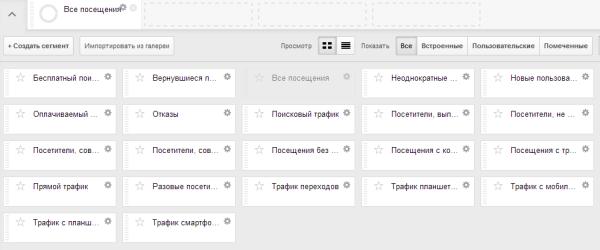
Thanks to the improved interface segmentation in Google Analytics has become more accessible to beginners users, and because of the advanced features it is a clear and precise analytical equipment for professionals.
Users can configure custom segments in accordance with specific criteria on the basis of data about visitors, to conduct cohort analysis and create different templates configuration.
Each user can create a new segment or import an existing one from Google Analytics Gallery.
4: User data
the Emergence of demographic data in Google Analytics it became one of the most important updates of this year. Such information about users as gender, age and interests is now available in the report of the Audience.
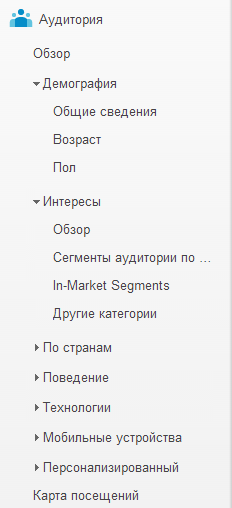
don't have to guess how looks the perfect buyer. Using this report, you can:
- learn demographic data 15% the most active buyers
- segment the campaign remarketing by sex, age and interests of the users
- use the data to carry out A/b testing
- adapt the content of the site in accordance with the interests of the most valuable customers.
To enable demographic information and data on the interests of the reports, should be:
- edit the tracking code for display advertising.
- update its privacy policy in accordance with the the rules of using Google Analytics, the CCM for advertisers.
- enable demographic reports in Analytics interface.
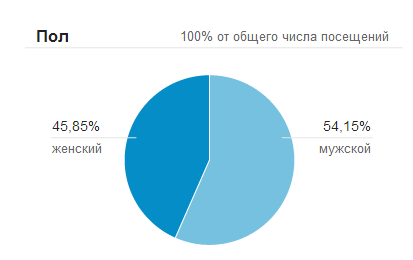
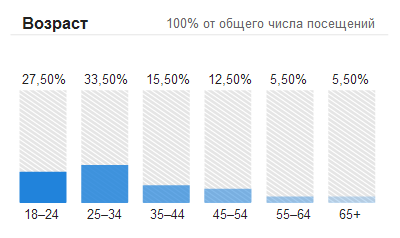
After the inclusion of reports and posting the amended code tracking data will be displayed within 24-48 hours.
5-e: the New auto-event tracking
This update allows you to track clicks on ads or CTA on the website. Moreover, auto-tracking events excludes codes JavaScript and HTML.
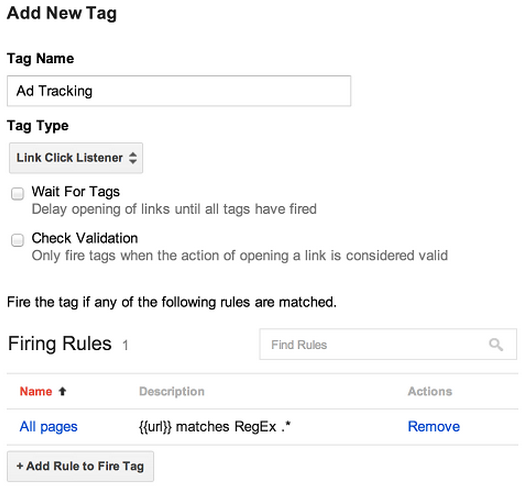
tag Manager of Google – is a free tool that allows you to manage the tracking codes on the website, such as Google Analytics tracking code, AdWords conversion tracking, and others. Manage all used tracking codes can be using one service and without manual configuration of HTML.
6: Training of users
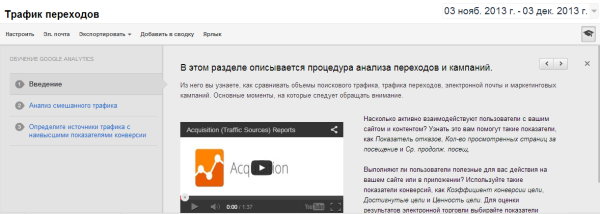
Along with the changes of the interface, the Google Analytics introduced new and improved training materials. Step-by-step video instruction were added to the tools, and the company presented to users a service of the Analytics Academy Digital video tutorials Analytics Fundamentals course, thanks to which users can learn the basics of working with GA and to better understand the principles of analysis and improve their results.
st. Akhmatova 9/18
st. Chornovola 2-A
Sat. 11-00 -16: 00